Use the Mega888Go APK link, keep Android protection on and read each permission before installing.
Ready to download the APK?
The button opens mega888go.ws/apk/dl/. You can return here for installation help.
Before downloading
- Update Android and your browser where possible.
- Keep Play Protect and device security enabled.
- Confirm you have enough storage and a stable connection.
- Use a unique password for any gaming account.
Android installation steps
- Open the download link in your normal browser.
- Review the displayed file and publisher details.
- Scan the saved file before opening it.
- Review every warning and permission request.
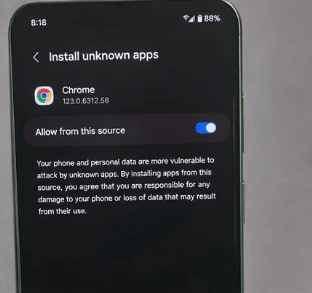
- After installation, turn off “install unknown apps” permission for the browser.
Do not disable protection blindly. If Android identifies the file as harmful or the warning cannot be explained, delete the file.
Common problems
| Problem | Likely cause | Next step |
|---|---|---|
| App not installed | Incomplete or incompatible APK | Delete the file and confirm the supported version. |
| Package conflict | Another signed build is installed | Confirm the upgrade path before uninstalling. |
| Frozen screen | Network, server or outdated build | Restart, test another network and check the version. |
Downloading and installing are two separate steps
When the browser reaches 100%, Android has only saved a file; it has not proved that the package is suitable or safe. Open the Downloads list, confirm the expected filename and compare any displayed size or version with the source page. A very small file, a changed name or a second extension is a reason to stop and check again.
Android may ask whether your browser is allowed to install unknown apps. That permission belongs to the browser, not to Mega888 itself. If you choose to continue, grant it only for the installation and switch it off again afterwards. Keep Play Protect and your normal device security running.
Updating an existing app
If Mega888 is already installed, Android may treat the new APK as an update. It will reject the file when the old and new packages use different signatures, even if their icons look the same. Before uninstalling, save your user ID and make sure you can contact the Mega888Go team for account recovery.
After a first-time installation, review the permissions. A game app should not need control of accessibility settings, device administration, text-message forwarding or unrelated financial apps. Deny anything that does not make sense and use the APK verification checklist.
After the app opens
Launch it from the new app icon rather than returning to a message link. Check that menus render correctly and that the version shown inside the app matches what you expected. Existing users can continue with the safe login guide; anyone seeing an installation message should work through the App Not Installed fixes before downloading again.
Continue with the right guide
- Compare all device downloads
- Diagnose an Android installation failure
- Check for fake download or support messages
- Open the Mega888 support centre
Android information reviewed by Mega888Go on 22 July 2026.