
Confirm the download page owner, inspect the domain, compare the file details, scan the installer and review all permissions.
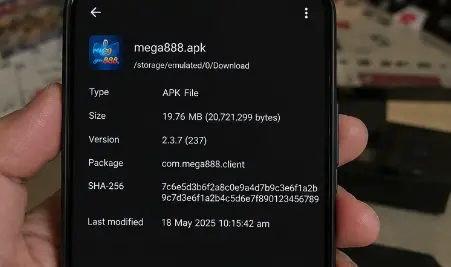
Before download
- Confirm who operates the download page.
- Check the domain character by character.
- Look for current version, date, size and developer details.
- Confirm how updates are published.
- Avoid unexplained shortened or mirror links.
File-level checks
- Compare a published SHA-256 checksum when available.
- Review the Android package or Windows publisher information.
- Scan the file locally before opening it.
- Investigate conflicting security results.
After installation
Review permissions, data use and battery behavior. Remove the app if it requests unrelated access or changes device settings unexpectedly.
A clean scan reduces risk but cannot prove operator licensing, payment reliability or future app behavior.
Use several checks, not one green badge
A padlock confirms an encrypted connection to the domain in the address bar; it does not prove that the site owner is the operator you expected. A clean antivirus result means the scanner did not identify a known threat at that moment; it does not guarantee future behaviour. Treat source, file details, scan results and permissions as separate pieces of evidence.
If two important details conflict—for example, the source shows one version but the downloaded package shows another—pause until the difference has a credible explanation.
What a checksum can tell you
A SHA-256 checksum is a fingerprint of one exact file. When a trusted publisher provides a checksum on a separate trusted page, matching it can confirm that your copy is byte-for-byte identical. It cannot prove that the original file was safe or that the publisher is licensed.
Compare the complete value, not the first few characters. If no reliable reference checksum is published, do not invent one or treat the number shown in a screenshot as verification.
Review permissions again after setup
Open the operating system’s app settings and check what was granted. Camera, contacts, SMS, accessibility, device-administrator and full storage permissions all deserve a clear purpose. Remove anything unrelated and uninstall the app if it attempts to regain access through misleading prompts.
Updates should go through the source you already used. An unexpected update message in chat is a new download decision, not proof that the installed app needs it. Compare the message with the fake-agent checklist.
Apply the checks to your device
- Android APK installation guide
- iPhone profile and certificate guide
- Windows installer guide
- Troubleshoot a specific app problem
App verification information reviewed 22 July 2026.