
Close the app on the previous device, wait a moment, restart the current device and try once.
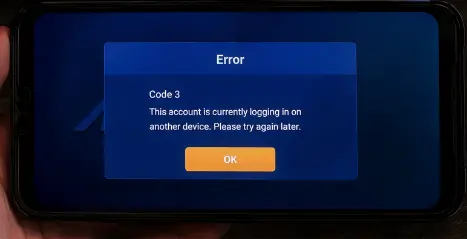
End the old session
- Close Mega888 on the previous device.
- Wait for that session to end.
- Restart the app on the device you want to use.
- Try once with the correct login details.
- Contact Mega888Go if Code 3 remains.
Do you recognize the other session?
If the other login was not yours, tell our account team and request a password change. Secure the phone number, Telegram or WhatsApp account linked to your support conversation as well.
A shared Test ID may already be in use. Choose another demo account instead of trying to change its password.
Why the old session can remain
The app may keep a session active briefly after it closes, especially when the connection ended suddenly. Give the previous device time to finish logging out. Opening and closing the app repeatedly on both devices can make the problem last longer.
Use only one device for the next attempt. If Code 3 returns, tell Mega888Go which two device models were involved and ask us to end the old session.
Personal account or shared Test ID?
On a public demo ID, another user may simply be testing at the same time. Do not try to take control by changing its password. Leave it and use another authorized Test ID as explained in the demo access guide.
On your personal account, an unrecognized session is more serious. Secure the linked phone, messaging account or email first, then request a session reset and password change through the established recovery channel.
Watch for false recovery offers
No helper needs a banking PIN or payment authorization code to close an app session. Do not install a “session unlock” APK or remote-access tool. Compare unexpected instructions with the fake-agent warning page.
If the wording on screen is not actually Code 3, return to the broader login failed checklist rather than forcing this solution onto a different problem.
Continue troubleshooting
- Use the full Mega888 login flow
- View all support topics
- Review account recovery preparation
- Secure the app and account
Code 3 information reviewed 22 July 2026.