Check the user ID and password, restart the app and try one more time on a stable connection. Avoid many rapid attempts.
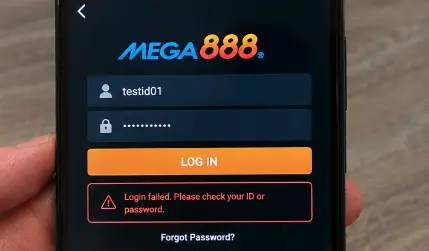
Check these in order
- Remove accidental spaces and check capital letters in the user ID.
- Restart the app and use a stable connection.
- Make sure you installed the expected app version.
- Check whether the account is still open on another device.
- Contact the Mega888Go team if the same message returns.
When to stop trying
Stop if you receive an unexpected reset message, a support contact changes without notice or someone asks for a banking one-time code.
Mega888Go can check accounts created through our team. Contact us from the same WhatsApp or Telegram conversation when possible.
Read the point of failure
If the app rejects the details immediately, recheck the user ID, capitalization and accidental spaces. If it spins for a long time first, the connection or service may be involved. If the app closes before showing a message, record the device and app version because that is more likely a compatibility problem than a password problem.
Try one change at a time. Switching network, editing the password and reinstalling all at once may make the screen change, but you will not know which action mattered.
Before clearing data or reinstalling
Make sure you know the user ID and can contact the team that created the account. Clearing app data removes saved information, and uninstalling makes it harder to confirm the previous version. Save a screenshot of the error and note the version first.
If the problem started after an update, return to the correct device guide. Android users with an installation failure should use the APK help page; iPhone users seeing a verification warning should use the certificate page.
Recover the account safely
Ask for a reset only in your normal Mega888Go conversation. We may need the user ID to find your account, but we do not need your banking code or remote access to your phone. If a new contact asks for an “unlock fee,” stop and read the fake-support warning.
After access is restored, use a unique password and secure the linked messaging or email account. If you do not recognize an active session, continue with the Code 3 security steps.
Useful next pages
- Return to the full login guide
- Choose another support issue
- Review account and app safety
- Contact the Mega888Go team
Login help reviewed 22 July 2026.